On this page
Roughly seven carts out of ten are abandoned before payment: the Baymard Institute, averaging 50 separate studies, puts the documented rate at 70.22%.1 For a WooCommerce shop that is the single biggest leak in the funnel, and also the easiest place to win sales back, because these shoppers have already chosen a product.
This article explains the two ways to recover carts, why the timing matters more than the discount, and how to set up chat-based recovery without turning your shop into a pop-up festival.
Why shoppers leave a full cart
The reasons are mundane, and most of them are questions nobody answered:
- Unexpected costs at checkout: shipping, taxes, fees.
- A doubt about the product: the size, compatibility, delivery date.
- Just browsing: comparing prices, saving the cart for later.
- Friction: an account to create, a payment method missing, a form that fails.
- Price: the total is a little more than they hoped to pay.
Notice that only the last one is solved by a discount. The others are solved by an answer, given at the right moment.
Two ways to recover a cart: e-mail after, chat during
Recovery e-mails are the classic approach. The shopper leaves, and a few hours later receives an e-mail with their cart and sometimes a coupon. It works, but only for shoppers who gave you their e-mail address before leaving, which on most shops is a minority of abandoned carts.
Chat-based recovery acts before the shopper leaves. When someone has been looking at their cart for a while without moving, or moves the mouse towards the close button, the chat opens with a short, relevant message. The shopper can ask the question that was holding them back, and the assistant answers on the spot.
The two are complementary. This article focuses on the second one, because it reaches every visitor, including the ones you have no e-mail for.
The rule that matters most: help first, discount last
A discount offered to everyone who hesitates teaches your customers to hesitate. A shopper who wondered whether the jacket runs small does not need 10% off; they need a sizing answer.
So the order is:
- Start with help. “Any questions about sizing or delivery before you check out?”
- Answer the real question. The assistant knows your catalogue, shipping rules and return policy.
- Offer a discount only when price is the objection, and only within limits you set.
Setting it up with E-commerce AI Assistant
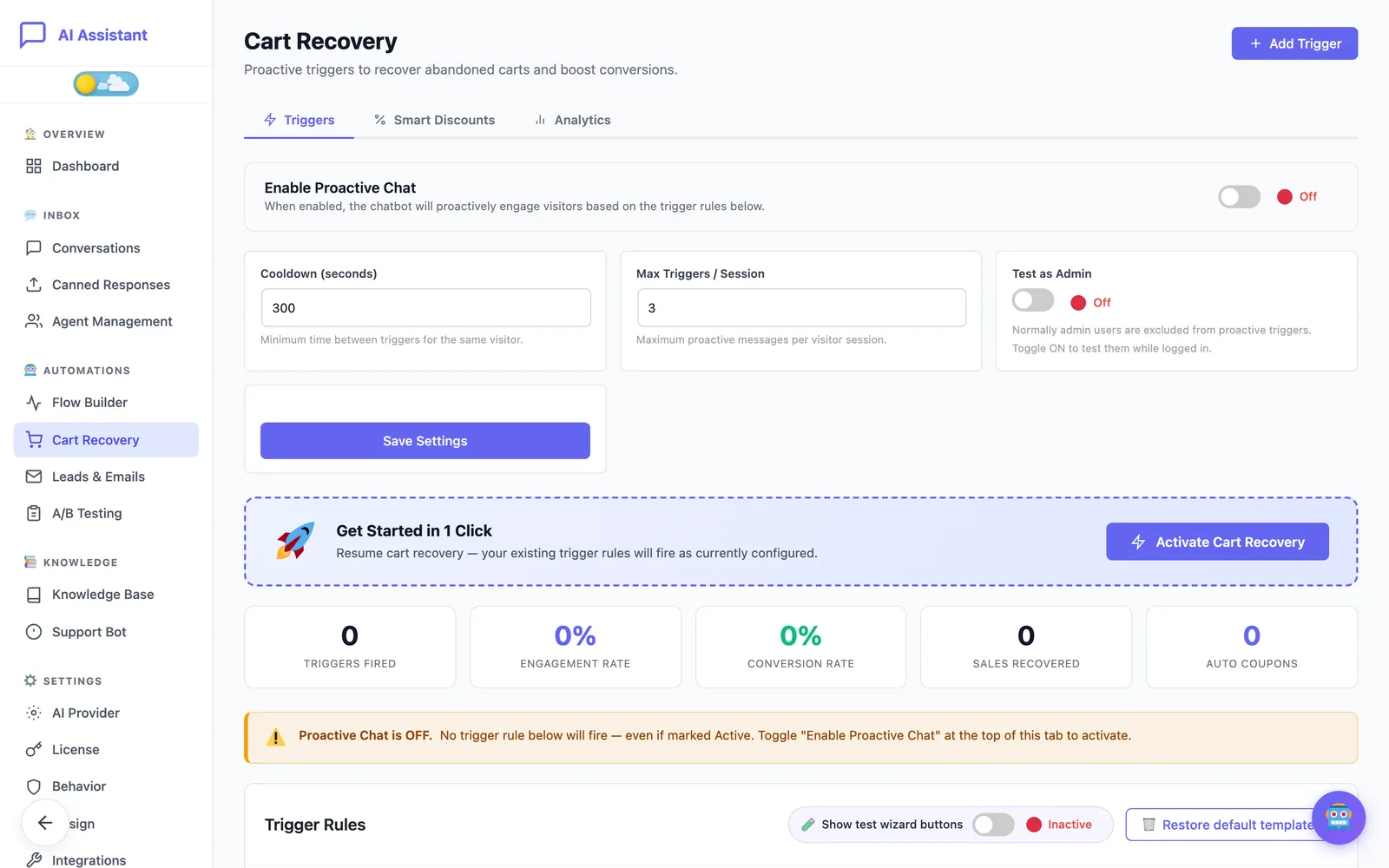
Cart recovery is part of E-commerce AI Assistant Pro and needs WooCommerce. It lives under AI Assistant → Automations → Cart Recovery.
1. Turn on the ready-made triggers
On the Triggers tab, click Enable Cart Recovery. This installs four rules you can edit or delete afterwards:
- Exit Saver: fires when the mouse moves quickly towards the top of the browser, as if to close the tab. Desktop only, since phones have no mouse.
- Cart Nudge: fires when there is something in the cart and the shopper has not changed it or checked out for a set time.
- Browse Helper: fires when a shopper on a product or other page has not clicked, scrolled or moved for a set time.
- Checkout Helper: fires after a set time on the cart or checkout page.
Each rule has its own message, with placeholders such as {cart_first_item} or {cart_total} so the message refers to what is actually in the cart: “Still thinking about the Merino jacket? I can check sizes or delivery dates for you.”
2. Set the politeness limits
Two settings stop the chat from nagging:
- Cooldown: the minimum time between two proactive messages for the same visitor.
- Max Triggers / Session: the most proactive messages one visitor can receive in a visit.
One or two messages per visit is plenty. Beyond that, the chat stops being helpful and starts being noise.
3. Configure discounts with a hard cap
The Smart Discounts tab controls what happens when a shopper says the price is too high. The assistant can offer up to three levels, for example free shipping, then 5%, then 10%, and creates a real, single-use WooCommerce coupon for that shopper only. It never invents a code.
The safeguards are what make this safe for your margin:
- Max Discount %: a hard ceiling no level can exceed.
- Min Cart Value: no discount on small carts.
- Coupon Expiry: generated coupons expire after the number of hours you choose.
- Single offer per session: a shopper cannot collect a trigger coupon and a negotiated one.
Level 3 is always the final offer. If the shopper keeps pushing, the assistant politely declines and reminds them of the offer they already have.
4. Test it like a shopper
Open your shop in a private window (administrators are excluded from triggers unless you turn on test mode), add a product to the cart and wait, or move the mouse up to the tab bar. Then open the chat and write “this is too expensive” to see the discount levels in action.
Measure, then adjust
The Analytics tab shows how many triggers fired, how many shoppers engaged, how many converted and the revenue recovered, per trigger. After two or three weeks:
- A trigger that fires a lot but rarely converts is too early or too generic. Lengthen its delay or rewrite its message.
- A trigger with high engagement but low conversion points to an unanswered question. Read those conversations: the missing answer usually belongs on your product page too.
- Discounts that convert at every level may mean your first level is generous enough on its own.
In short
Recovering abandoned carts is less about coupons than about timing. Answer the question that stopped the shopper, at the moment it stops them, and keep discounts for the shoppers whose only objection is price, capped by rules you control.
Sources
Figures and statements from other organisations, as published on the date shown.
- Baymard Institute, “Cart Abandonment Rate Statistics”, average of 50 studies, baymard.com/lists/cart-abandonment-rate (accessed 18 November 2026).